
⭐ New simulator supported: Assetto Corsa (AC)
- The old school vibes are back! AC is now fully support on par with the existing ACC support
- Enjoy racing in modded tracks, cars, weird configurations all through Assetto Corsa
- DRE supports all sim modes such as Single-Player and Multi-Player
- Use DRE to control your pit stops in AC
- DRE navigates and adjusts the Quick Pit Menu for you
- See how to right here
- Have fun racing AC!
⭐ Braking Overlap Signal
- New coaching Signal that helps you hear when brake and throttle overlap during braking zones.
- You can use it to:
- clean up pedal inputs without staring at telemetry or the simulator pedal UI
- avoid re-applications of braking
- save fuel by essential short lift-and-coasting
- improve cornering consistency
- improve lap times
Pedal Overlap Thresholdis set to 2% to allow slight overlap. Ultimate subscribers can tune this setting.Pedal Overlap Ignored Carsis a filter to exclude certain cars from the signal. You can easily add additional cars.- Quick throttle blips for downshifts and early corner exit throttle are ignored.
- The Signal does not chatter through small throttle and brake changes during the braking zone after the Signal has sounded once.
- Enable and adjust the Signal in
Car -> Peripherals -> Braking Overlap - Give it a listen right here
⭐ Adjustable pit speeding alert and signal speed offsets
- Added a Pit speeding alert offset setting so you can choose when DRE warns in pit lane.
- Keep the existing +2.1 km/h default, or tune the margin from -2.0 to +5.0 km/h for stricter pit lanes and cars without a limiter.
- Added a separate Pit Speeding Signal Offset, defaulting to +0.10 km/h and adjustable from 0.00 to +2.00 km/h.
- If the Pit Speed Approacher signal is disabled, the pit speeding signal can warn before pit entry when you are still too fast.
- Disabling the Pit Speed Approacher signal now stops the approacher sound immediately.
- Fixed a bug where the Signal would only sound if the Alert logic was considered "speeding". The Signal is now independent of the Alert logic.
- Available with Performance or Ultimate subscription tiers.
- Adjust in
Pit -> Pitlane -> Speeding
⭐ Create your own voice commands for actions outside the simulator.
Custom Commands can now send keybinds to other apps, such as OBS, Racelabs, SimHub, and similar tools.
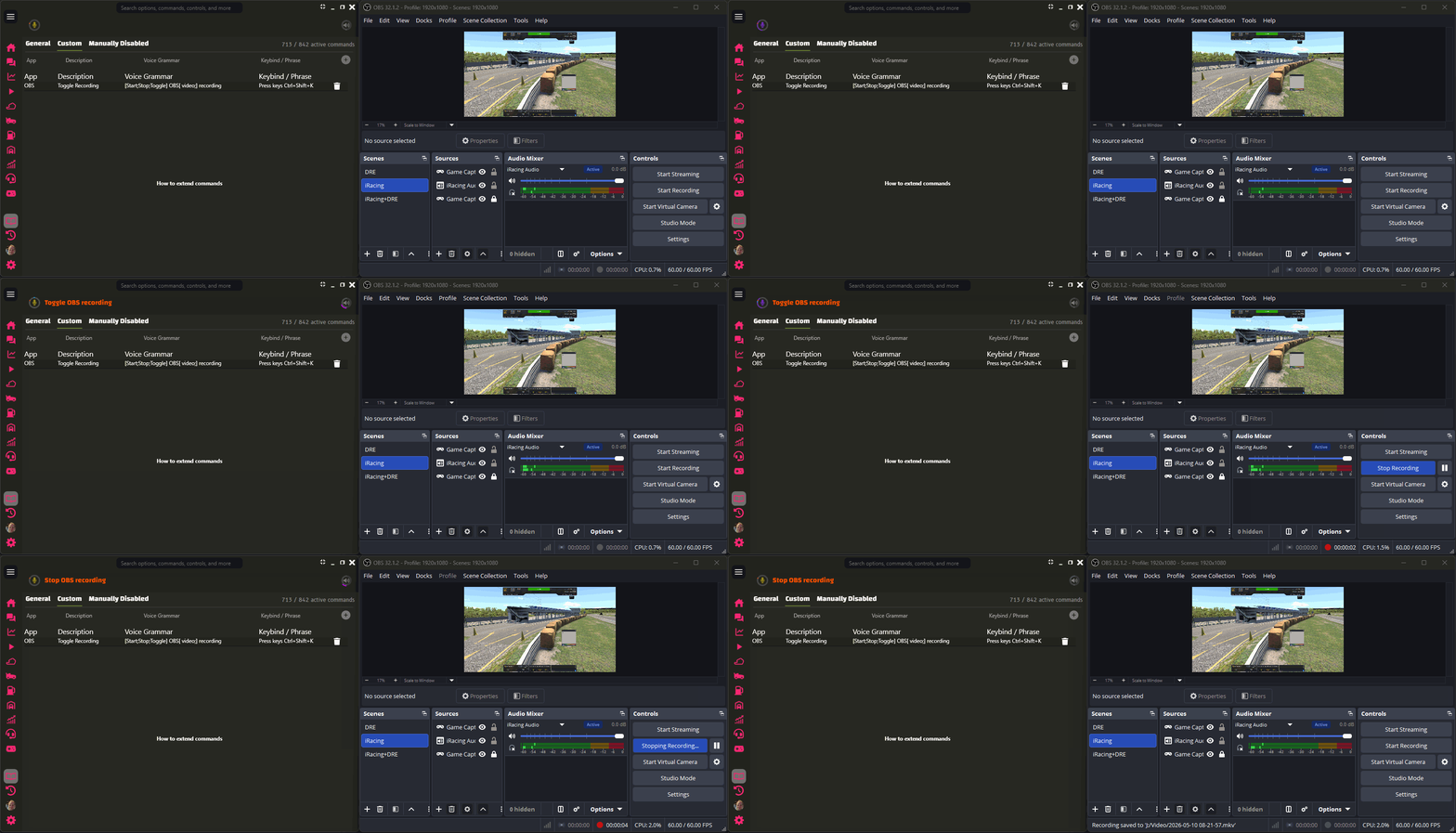

Use this for stream scenes, overlays, dashboards, or other external shortcuts without taking focus away from the sim.
You can also use DRE’s built-in external key command directly:
- Press keys
- Press keys
to
- Press keys
Examples:
- Press keys NumPad4
- Press keys Ctrl+Shift+K to obs64
The key combo must use the exact canonical key names DRE supports.
The optional to
part is a safety check. DRE checks that the named process is running before it sends the shortcut. Process matching is exact but case-insensitive, and .exe is optional, so obs64 can match obs64.exe. Important details:
- DRE does not focus or activate the target app.
- DRE keeps simulator focus.
- The target app must listen for global shortcuts.
- A successful key press is silent.
- Invalid key combos warn and send nothing.
- Missing target processes warn and send nothing.
- DRE and the target app must run with the same privilege level. If one runs as admin and the other does not, DRE warns and sends nothing.
- You can still use Custom Commands to trigger DRE’s built-in commands with your own phrases, so the wording fits how you actually talk while racing.
🔄 Improved Classic Recognition loading time
- Classic Recognition now gets ready much faster after connecting to a session.
- Measured loading time improved from about 39.5 seconds to about 14.5 seconds.
- That is roughly 63% less waiting time, or about 2.7x faster startup for Classic Recognition.

🔄 Window shortcut buttons are easier to use
- Added an Always on Top shortcut next to the window controls.
- Improved the shortcut button colors and hover areas, including the Shrink button.
✅ iRating gain callouts played in tiny classes
- DRE stays quiet about iRating gain positions when fewer than five drivers are in your class.
- Manual iRating gain position questions still work when the command is available.
✅ Pit-stop changes were announced when entering the car
- Fixed a false pit-stop changes callout when you enter the car before driving.
- Auto Fuel can still update the planned fuel before the pit-stop changes callout plays.
✅ Updates got stuck while DRE was running
- DRE closes more reliably when an update starts, so the installer is less likely to wait for DRE in the background.
- Silent updates can restart DRE again after the install finishes.
✅ Hot-lapping alerts played too late
- DRE is less likely to tell you to yield for a hot-lapping car after the moment has already passed.
- Hot-lapping yield alerts now name the driver directly instead of saying only
him,her, orthem.
✅ LMU session data stayed stale after changing sessions
- DRE waits for fresh LMU car, session, and standings data before using a new session.
- Position, class position, leader, and driver-count calls should be more reliable after returning to the menu or joining another LMU session.
- LMU bug reports are less noisy when LMU is open but not in a live session.
✅ LMU rain could be reported as dry
- DRE reads LMU rain from the strongest available weather source, so current weather, track wetness, and pit-stop tire calls better match rainy sessions.
✅ iRacing pace car data pointed at the wrong slot
- DRE handles recent iRacing pace car data where the pace car appears in session info but has no matching live telemetry slot.
- Pace car gap and pacing logic are less likely to use stale or incorrect car data while iRacing’s pace car telemetry is bugged from 26S3 release.
✅ Rare crashes caught by the bug tracker
- Fixed rare crashes in fuel calculations, speech recognition startup, voice command parsing, iRacing session data, DLC file tracking, and Analytics track charts.
- DRE handles temporary simulator, speech, and UI data problems more gracefully instead of interrupting your session.
✅ DRE crashed while preparing voice command settings
- DRE is less likely to crash during startup while preparing generated voice commands for settings.
✅ Fuel Analytics crashed on rare fuel window draw states
- DRE handles rare Fuel Window chart draw problems more safely while keeping the hatched fuel-window highlight.
✅ LMU settings files blocked simulator detection
- DRE handles empty or corrupted LMU settings files more gracefully and can keep searching for LMU with the default connection settings.
✅ Voice command setting changes failed on unclear speech
- DRE handles unclear voice input for multi-option settings more gracefully instead of reporting an internal error.
🐛 Known Issues
- Potential issues with Fuel Fill Rates in iRacing sessions that use new Regulations rule sets, which may alter the fill rates. Investigating…
- None 🎉 Found a bug?

